

How would MiP look at your club?
Tell us how your school works. We will show you personalisation and each role’s workflow in a demo focused on your daily activity.
Request a demoby MiP Sports
Your school has a name, colours and its own way of working. The new version of MiP Pádel brings that identity into the app while keeping the people who organise, coach and train connected.
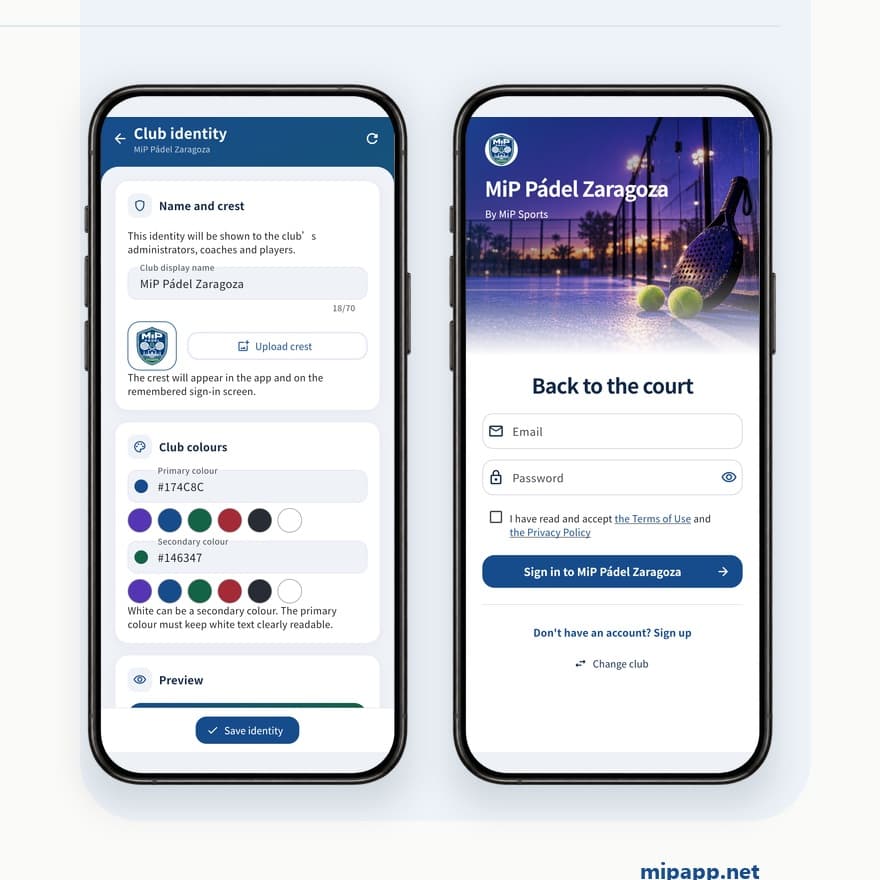
When a player opens their school’s app, the name and crest help them recognise where they are. For the club team, that identity provides continuity with the experience they offer on court.
Personalisation is one of the changes we are highlighting in this update. From the club identity screen, a club can configure the elements shown in the app:
The club sign-in screen displays its name and crest before users enter. Personalisation is part of the experience that managers, coaches and players encounter when using MiP.
The screenshot shows an example club. Your school can keep its own identity; the colours shown here belong to this particular configuration. When choosing them, check that text and buttons remain easy to read.
Visual identity supports an idea that remains central to MiP: organising a school’s activity around the three roles involved. Planning, training and follow-up remain part of that work; the updated video shows them using the current screens.
For the club, the dashboard brings together upcoming sessions, active coaches and alerts. Managers can review planned activity and spot situations such as a session with low attendance confirmation.
For the coach, the next lesson, planned attendance and training blocks share one view. For the player, season sessions and training content are available from their profile. Each person accesses the information from their role within the team.
Good organisation also matters on court. The library lets coaches search for exercises and filter by training block, category or level. Each exercise sheet provides its objective, setup and practical instructions.
The screens show examples of warm-up, main practice and finishing activities. The coach chooses the work, adapts it to the group and decides what the session should achieve. Player reports and objectives provide a reference for building on that work.
We have refreshed the presentation with real app screenshots, including identity settings and personalised sign-in. In 1 minute and 14 seconds, you can explore the club, coach and player views, exercise library, reports and planning.
Screenshots use an example club and sample data. The video is available in Spanish and English, with the corresponding screens and presentation text for each language.
Tell us how your school works. We will show you personalisation and each role’s workflow in a demo focused on your daily activity.
Request a demo